Organizes money already spent
Classifies transactions so you can review where your money went.

No Buy Savings Tracker
See the moneySkip a purchase, log the amount, and watch your no-buy decisions add up across today, this week, this month, and all time.
FREE TO DOWNLOAD

WHAT THE APP HELPS YOU DO
The app stays focused on one job: helping you capture, understand, and repeat the moments when you chose not to spend.
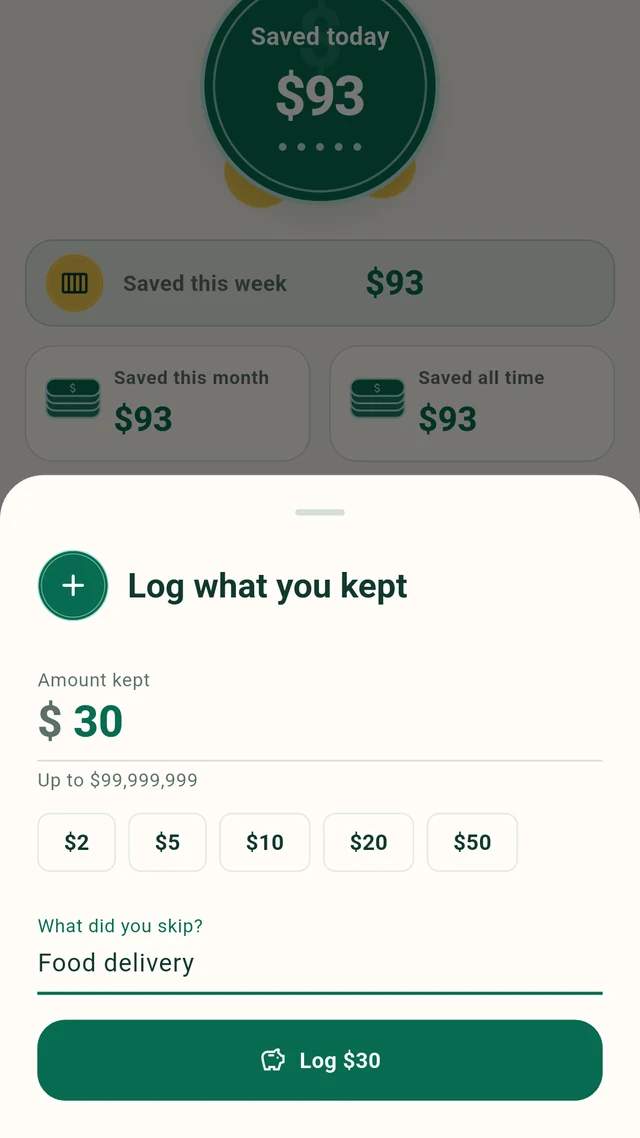
Type the amount that fits the decision. The app does not limit you to products or preset prices.
Save the amount by itself, or add a short description when it will make the entry easier to remember.
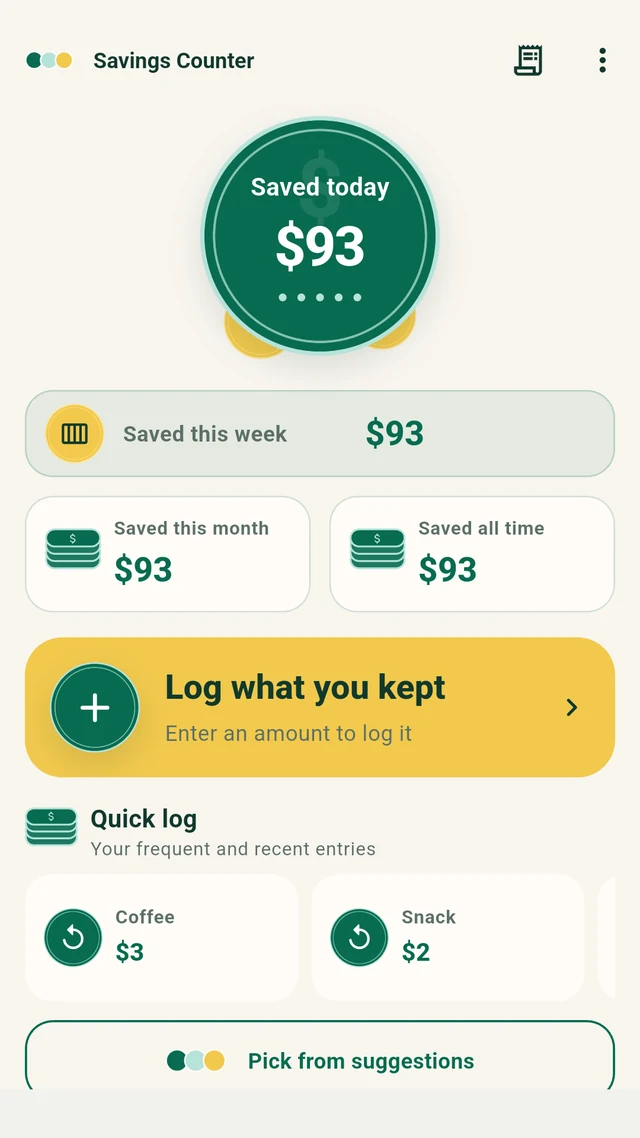
Today, this week, this month, and all time stay together on the home screen.
Frequent and recent entries are easy to bring back, with the amount available to review before saving.
Correct an amount or note later, and remove entries you no longer want to keep.
Send your monthly total, entry count, and common notes through your device’s share menu.
A QUICK TOUR
These are real English app screens filled with example entries to show how No Buy Savings Tracker feels after a few days of use.
STEP 01
The home screen puts the result first. Your latest totals, the main logging action, and shortcuts for familiar entries live in one place.
STEP 02
The amount is the only required part. A note can add context, but the app never makes description or category work a condition of saving.
STEP 03
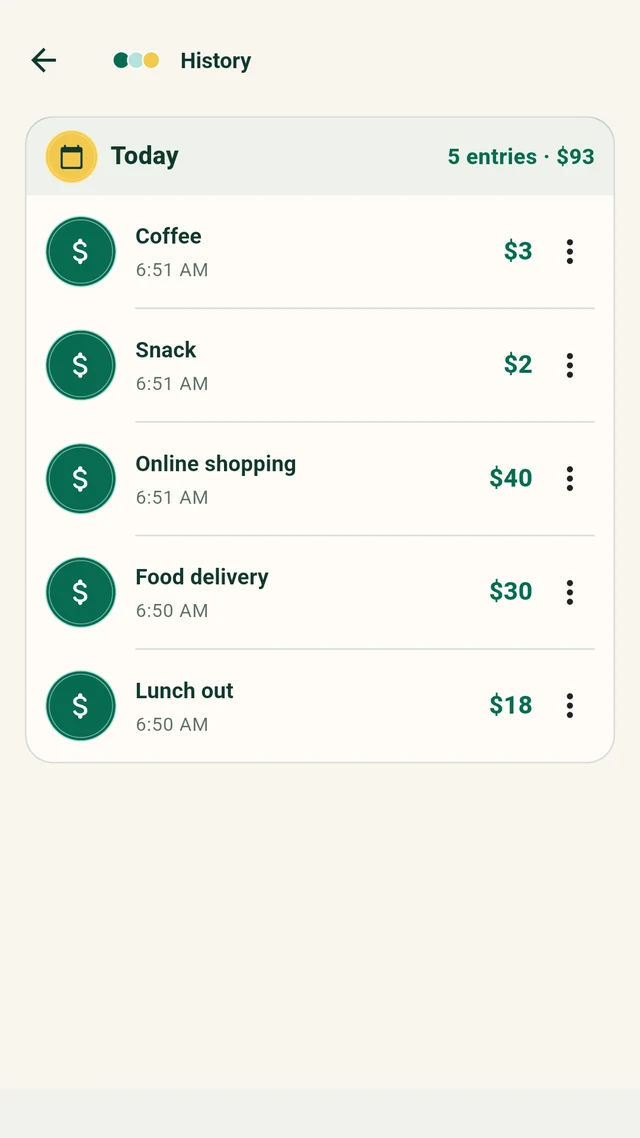
History groups entries by day, so the headline number never loses its context. It is also where you can clean up a mistake.
A ROUTINE THAT FITS REAL LIFE
The in-app introduction recommends a lightweight routine that works even when every day is different.
Enter the amount while the choice is still clear. Add the note later if you need it.
Bring back a familiar entry with Quick log and change the amount when today is different.
A low-cost item still belongs in the story. The total is built from real decisions, not impressive ones.
Use the weekly total to notice which no-buy choices feel easiest to repeat.
YOUR FIRST WEEK
You do not need a dramatic spending freeze. Start with the purchases you genuinely decide to skip and record only the days that matter.
Lunch out$18
Food delivery$30
Online shopping$40
Snack$2
Coffee$3
PRIVATE BY DESIGN
No Buy Savings Tracker is a personal behavior log, not a bank or money-transfer service. It records the amounts you enter; it does not move money into an account.
Open the app, finish the short introduction, and make your first entry.
Your amounts and optional notes are not sent to an app-specific server.
Open the privacy policy from About. Where required, the app asks for advertising consent before requesting ads and provides Privacy choices in the menu.
English uses dollar-based examples and Japanese uses yen-based examples. Choose either language inside the app.
FAQ
The short answers to how No Buy Savings Tracker works—and what it deliberately does not do.
No. The amount is enough. Add a note only when it will help you remember what you skipped.
No. Manual entry is the main flow, so the app can fit any purchase you decide not to make. Quick log is an optional shortcut for your own recent and frequent entries.
Yes. Open History to edit an amount or note. You can also delete an individual entry after a confirmation step.
No. No Buy Savings Tracker records and totals your decisions. It does not make deposits, transfers, or changes to a bank balance.
Recent and frequent entries can appear in Quick log. Select one, review or change the amount, and log it again.
Your amounts and optional notes are stored on your device and are not sent to an app-specific server.
Yes. The menu includes “Delete all entries,” and the app asks you to confirm before continuing.
Yes. The monthly recap can include the total, number of entries, and commonly used notes, then pass that text to your device’s share menu.
Yes. No Buy Savings Tracker uses Google AdMob. Where required, the app presents consent choices before requesting ads, and eligible privacy choices can be reviewed again from the menu. The privacy policy is available from About this app.
START WITH ONE CHOICE
No full budget. No account setup. Just one amount that becomes the beginning of your total.